
"Your program is stupid. It doesn't work," my wife told me
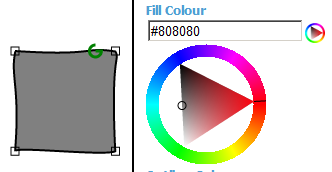
Naturally, she clicked on the blue outer portion of the colour wheel.
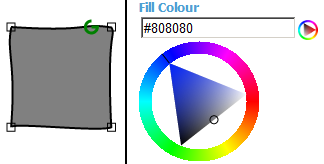
The colour wheel works, of course. It works exactly the same way as Inkscape and other graphics design software. Clicking on the ring sets the hue. But when the saturation is zero, the hue component doesn't matter, because the absence of colour is always gray.
On Zwibbler, this always happens, because the default colours are black and white.
With one line of code, I made the colour wheel behave the way she expected, and eliminated a negative experience for first time users.
(Update in response to criticism.) The fix I made matches expectations of new users, as well as experienced designers. If the current colour has saturation level 0 (i.e. it's white/black/gray), and you click on the outer ring, then obviously your intention is to eventually increase the saturation. Otherwise what you are doing has no effect. The program sets the saturation component to 1.0 only in that specific case. Otherwise, it leaves your current position in the triangle alone, allowing you to rotate the hue value.
Comments