
I built a Chrome extension that lets an LLM “see” tweets
My X (formerly Twitter) account is 17 years old. In internet years, that’s ancient.
For a long time, that history was a badge of honor. But recently, when I tried to pivot my focus from general tech to financials and SaaS growth, I realized that my history was actually an anchor. The algorithm had me pegged. It knew exactly who I was—or who I used to be—and it refused to show my content to the new audience I wanted to reach.
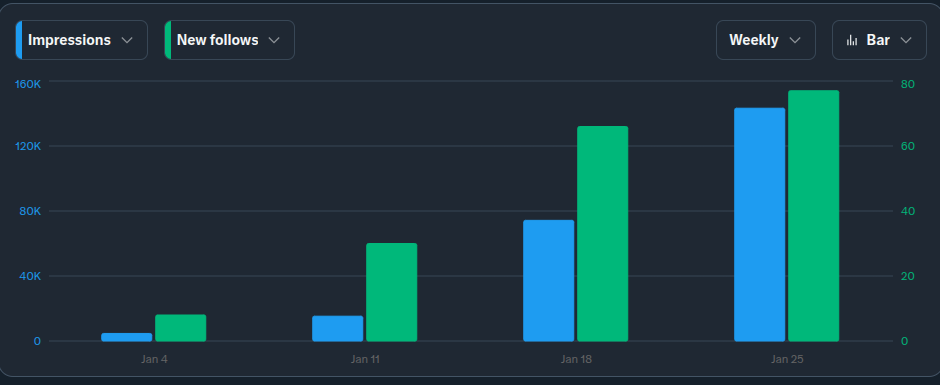
I went from shouting into the void to 10,000+ daily impressions in just one week. Here is the engineering breakdown of how I retrained the model, and the tool I built to do it.
The Algorithm: A Technical Summary
If you are struggling to pivot an older account, you are likely fighting the new architecture described in X's open source documentation.
The new recommendation pipeline is far more sophisticated than the old models. It funnels posts from two main sources into a Grok-based Transformer that predicts engagement.
- Thunder (In-Network): This handles posts from accounts you already follow. It's fast, efficient, and keeps you in your echo chamber.
- Phoenix Retrieval (Out-of-Network): This is the key to growth. It uses ML-based similarity search across the global corpus to find content relevant to you from people you don't follow.
The Problem: My engagement history (User Action Sequence) was feeding the Phoenix model old data. It didn't think I was relevant to the Financial/SaaS community, so it wasn't retrieving my posts for those users.
To fix this, I had to feed the Grok-based transformer a new sequence of actions. I needed to execute a calculated "Reply Guy" strategy: inserting myself into the "Phoenix Retrieval" buckets of high-authority accounts in my new niche.
The "Blind Research" Problem
If you’ve ever turned to AI to help brainstorm a reply or find a unique angle on a topic, you know the frustration. It often misses the nuance. It suggests generic angles like "Great insight!" because it doesn't actually understand what is happening on the screen.
The problem isn't the model; it’s the context.
X is a visual platform. It’s memes, it’s screenshots of revenue dashboards, it’s subtle visual jokes in the background of a photo. A text-only LLM is effectively blind. It can't help you research a clever takedown or a relevant insight if it can't see the subject matter.
I realized that if I wanted a true research partner—something that could inspire me rather than just spit out generic text—the AI needed to see exactly what I was seeing. It needed to spot the hidden detail in the background ripe for a comment.
The Permission Nightmare
My first instinct was to just grab a screenshot of the tweet. Technically, this seemed trivial. But as I dug into the Chrome Extension documentation, I hit a wall.
I spent hours trying to make html2canvas work. The dream was to render the DOM nodes of the tweet into an image canvas. But X’s DOM is a labyrinth of overlapping layers and complex CSS, and html2canvas is essentially trying to emulate and entire browser in javascript. The resulting images were a garbled mess of text artifacts.
So, I looked at the standard Chrome Capture API (chrome.tabs.captureVisibleTab). This would work, but it came with a "poison pill." To use it, my extension would need permission to access data on <all_urls>.
I have been building software for a long time. I knew that requesting "Read/Write access to all websites" is the quickest way to get rejected by the Chrome Web Store—and the quickest way to lose user trust. I wasn't willing to bankrupt my reputation for a screenshot.
The "Zwibbler" Solution
Finally, as a last resort, I reached back into my past. I remembered a trick I learned while building Zwibbler, a collaborative javascript whiteboard I built (and still offer — I’m just waiting for that upstart copycat that rhymes with “see mel” draw to burn through their ill-advised VC funding).
I realized I didn't need the heavy-handed Chrome Capture API. I could use the Media Stream API (getDisplayMedia)—the exact same technology that Zoom and Google Meet use when you share your screen.
It was perfect.
- It requires no broad installation permissions.
- It invokes a native browser prompt asking the user, "Do you want to share this tab?"
- It captures a pixel-perfect stream of the tweet, memes and all.
// The "Zwibbler" Trick
async function captureTweetContext() {
  // Triggers the native browser permission prompt
  const stream = await navigator.mediaDevices.getDisplayMedia({
    preferCurrentTab: true,
    video: { displaySurface: "browser" }
  });

  // Extract a single frame for the LLM
  const track = stream.getVideoTracks()[0];
  const imageCapture = new ImageCapture(track);
  const bitmap = await imageCapture.grabFrame();

  // ... stop stream and process bitmap
}
Now, the tool wasn't just processing text. It was looking at the post. It could analyze a chart, interpret a meme format, or highlight a chaotic desktop background for me to reference in my reply.
The Hardest 100 Posts
With the "Vision" problem solved, I committed to the grind. For the first week, I made 100 posts a day—the ultimate Reply Guy marathon.
Even with the plugin handling the visual analysis and suggesting angles, my commitment to avoiding "AI slop" meant I was still spending significant time on each reply.
It was a collaborative process. I’d read a post, let the extension analyze the image for hidden details, and use that research to spark an idea. We would workshop the angle together, but the final words were always mine.
But I quickly found that most of the replies I was slaving away at didn't get any traction. I would craft a perfect, context-aware breakdown of a stock chart, and it would die with 12 views.
Meanwhile, some replies that I dashed off without a second thought became viral, gaining 50+ likes over days and getting reposted.
The difference? Reach.
Solving for Reach (Client-Side Phoenix)
I realized I was wasting my best material on threads that were already dead. To make the Reply Guy strategy work, I needed a way to focus my efforts on the posts that would get the most engagement.
X uses a "Grok-based Transformer" (Phoenix Scorer) on the server to predict probability of engagement. I needed a "Light Transformer" on the client to predict where I should invest my time.
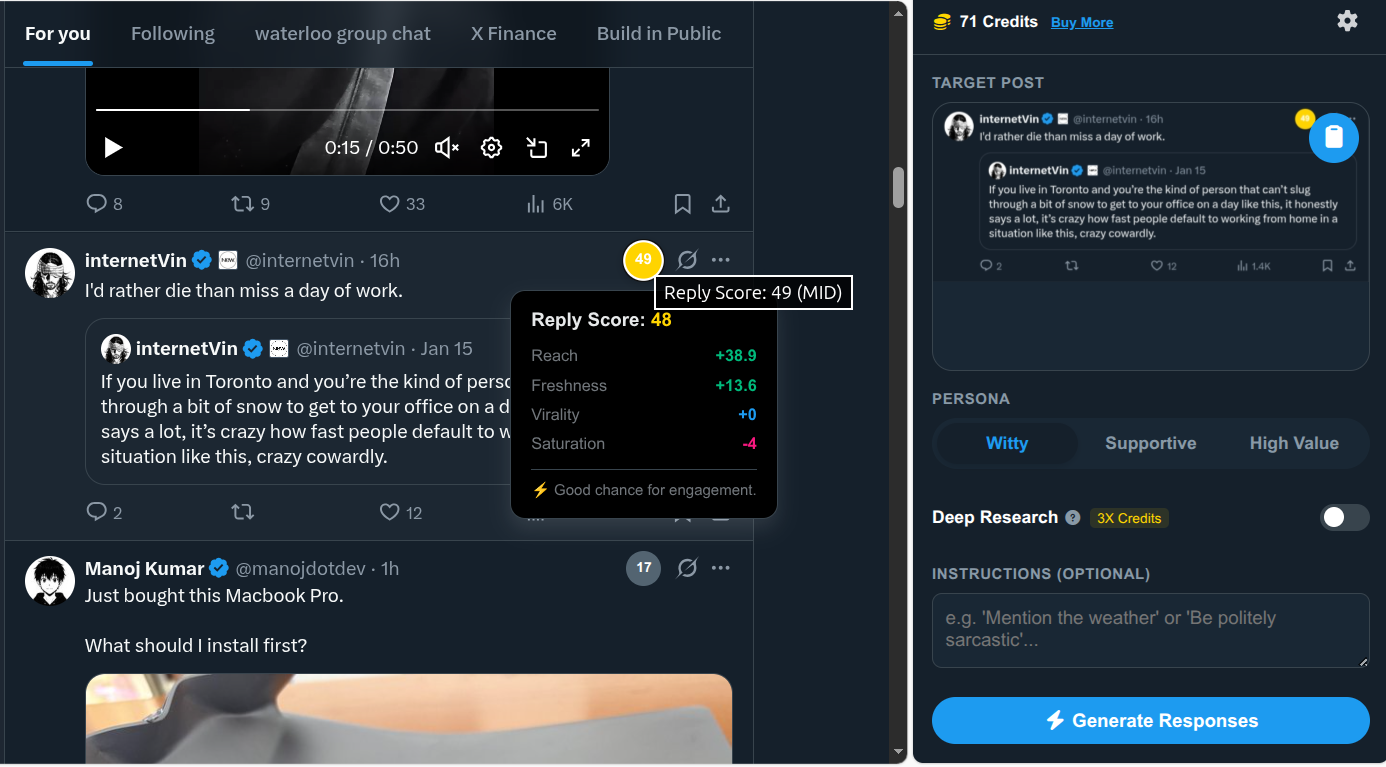
I built a scoring engine into the extension that acts as a client-side ranking model. It analyzes the "Viral Potential" of a tweet before I even write a word, looking for high-authority accounts posting fresh content that hasn't been saturated by hundreds of replies yet.
Now, instead of doom-scrolling, I get a clear signal:
- Green Pill: High Score. The tweet is fresh, from a good account, and has an open lane. ENGAGE.
- Red Pill: Low Score. The tweet is saturated or low-value. IGNORE.
The Results
This combination—Visual Context for inspiration and Algorithmic Scoring for reach—changed everything.
My impressions jumped from ~200/day to over 10,000/day. The Phoenix algorithm finally started to learn who I was. Because I was engaging with the right accounts with high-quality, relevant content, X started showing my posts to the financial and tech community I wanted to be a part of.
I’ve polished this tool up and released it as X-Reply-Extension. It's effectively a collaorative Reply Guy co-pilot to help push through the grind of replying to X posts.
It’s currently in beta. You can grab it here: xreplyextension.com
Let me know if it helps you retrain your algorithm.
Comments