
Usability Nightmare: Xfce Settings Manager
Quick! Where do you go to increase the text size in all your applications? Can you pick the right button on the first try? Do you feel lucky, punk?
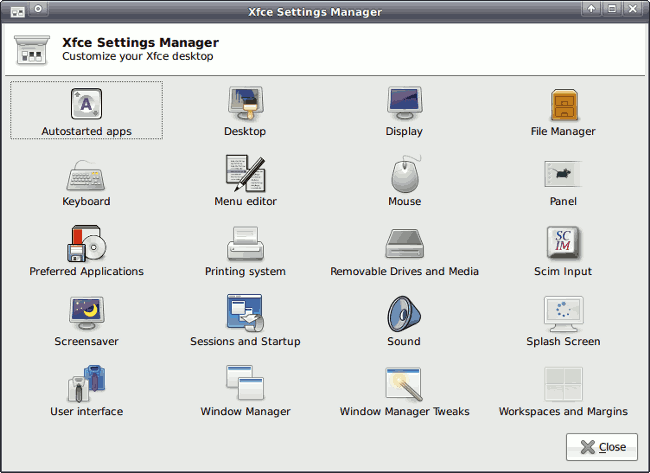
- Desktop, because it's at the top, I see it first, and text is a part of my desktop experience.
- Display, because that's where the setting is in Windows XP.
- User Interface, because everything I have ever wanted to change is a user interface setting.
- Panel, because I also want to change the text size on the panel.
- Window Manager, because windows can display text on them.
- Window Manager Tweaks, because I want to tweak to how text is shown.
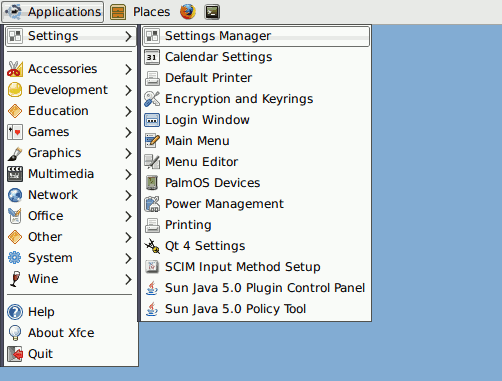
Or maybe you're in the wrong settings manager. The first hurdle was in the Settings menu. Text settings aren't mentioned at all, although some things are in two or three places. I'm glad I'm not setting up a printer!
It turns out that we chose wisely. Unfortunately, in the Xfce Settings Manager, text sizes are distributed between two categories. Choose Window Manager for the window title bars, and User Interface for everything else.
Can't you come up with a better way of organizing settings than Windows 3.1? Has the state of the art in Settings dialogs not advanced since 1992?
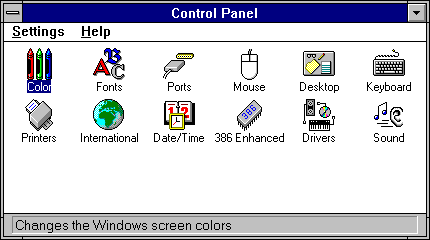
At least Microsoft's control panel was unambiguous. It even had a description in the status bar of what you were going to click on.
Today's Usability Tips
- Did you notice that I never mentioned the word font? New users might call things by different names. More people in the world know what "text size" means than "font size".
- Manuals have gone the way of the floppy disk. Instead of writing a manual, spend time just watching someone use your software, so you won't need one in the first place.
- People read the screen from the top down. Take advantage of this, and put the most common settings first.
- If your software has many settings, thoughtlessly dividing them into categories is a sure way of making them more confusing.
- If you are copying user interface layout from Windows 3.1, at least do it right.
Comments