
qb.js: An implementation of QBASIC in Javascript
Those who are familiar with compilers have the ability to think on another level. For them, visible about 10 cm behind the computer screen is a whole other level of code, which contains how the programming language might be implemented. Beyond that, further in the distance, lies assembly language, with its precarious branch prediction, happy cache hits, and misrable misses.
Here is an implementation of QBASIC in Javascript. In this next series of blog entries, we will explore its inner workings, covering all parts of the compilation process.
Only text mode is supported. The most common commands (enough to run nibbles) are implemented. These include:
This is far from being done. In the comments, AC0KG points out that P=1-1 doesn't work.
In short, it would need another 50 or 100 hours of work and there is no reason to do this.
The parser is slow because we are using a simple Earley parser. (EarleyParser.js). Update in 2014: If I ever do this again I would use a "Packrat" parser.
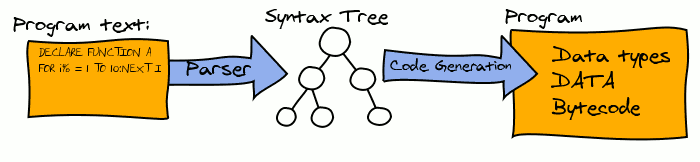
The compiler takes your BASIC program and converts it into a list of user data types, data from DATA statements, and bytecode statements. Here's pretty picture of the previous sentence:
If you just look at the Javascript source it will be confusing to figure out what goes where. So here is a map of all the important "classes" of the system:
Unfortunately, there is a problem with my implementation of the GLR parser. I think I know how to solve it, but at the moment, the system uses the very slow, but concise Earley parser, in EarleyParser.js EarleyParser.js.
The most straightforward way of creating a basic compiler in javascript is to directly translate the basic into javascript functions. But this approach will not work for two reasons. First, there is "goto" which, although it is a reserved word, is not yet in Javascript. (Obviously, ECMAScript community finds "with", prototype inheritance, and the rules of the 'this' keyword to be far less confusing than allowing "goto"). It is possible to automatically move statements around to eliminate GOTO, but you don't want to go there.
The other problem is that browsers tend to freeze until javascript programs finish running. To avoid freezing the browser until the program ends, we break the program into small chunks, and execute a few of those chunks every so often using a javascript timer. This gives the appearance of a running program and doesn't freeze the browser.
Bytecode solves both of those problems. By breaking the program into bytecode instructions, we can implement goto by just changing which instruction we are going to execute next. We can also suspend execution any time to allow the user to interact with the browser.
The virtual machine executes programs, which consist of types, an array of instructions, and a set of variable names which are shared. It has some data:
Javascript excels at looking up things in objects and mapping strings to functions. This makes the virtual machine instruction lookup very efficient.
All of the information about each instruction is stored in a single object, called "Instructions". That means we can run dispatch instructions very simply, leaving the heavy work of figuring out where the code is to the javascript runtime:
Each instruction can manipulate the stack, set variables, or change the pc to jump to another location.
And here's the bytecode produced to run the above statements:
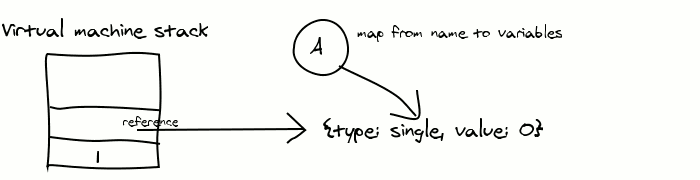
PUSHCONST 1 pushes a number 1 onto the stack. PUSHREF A is a bit complicated, though. It pushes a reference to variable A onto the stack. Since there was no prior value of A, it has to create one with the default type of SINGLE and adds the mapping from the name "A" to that variable. After all that housekeepint, it does the push. The state of the virtual machine looks like this:
The ASSIGN instruction expects a reference and a constant on the stack. It removes them, and assigns the reference to the variable. Here's the actual javascript implementation of the instruction:
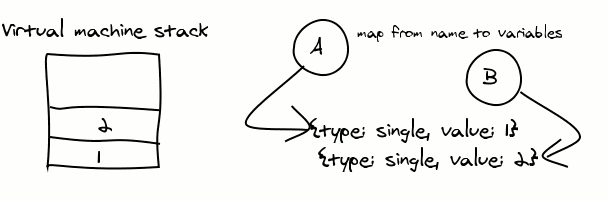
Let's look at instructions 6 to 8. We've seen PUSHREF, and PUSHCONST, now what's PUSHVALUE? This instructions the variable name and pushes its current value on the stack. After instruction 7, the state of the virtual machine is this:
All of the instructions are pretty simple to implement. Here's how the "+" instruction works. Thanks to Javascript, it works for both strings and numbers.
Finally, we call the "print" system function, which just pops the result off the stack and displays it on the screen.
Here are the other instructions:
The console performs these functions:
The console uses an HTML Canvas object for display. It has an image of every character in the IBM character set. When you want to print something, it first draws a solid rectangle of the background colour at that position. Then it copies the character's image, leaving alone any transparent pixels.
In input mode, anything the user types is displayed on the screen and copied to a buffer. When you hit enter, input mode ends, and a completion function is called to restart the virtual machine and process the input.
While not in input mode, and you hit a key, it is converted into a QBASIC character code and added to the keyboard buffer. This buffer is used for the INKEY$ function.
We've covered the runtime system of our virtual computer. We've left out how to handle arrays and function calls. For those features, you'll have to look up how the ARRAY_DEREF and CALL instructions are implemented, in virtualmachine.js.
function createDummyString( length )
{
    var result = "";
    for ( var i = 0; i < length; i++ ) {
        result = result + " ";
    }

    return result;
}
 In some languages, strings are immutable, so result could be repeatedly created, copied, and destroyed millions of times in this one function call.
What works
What doesn't work
License
License is GPL v3.
Overview of the system
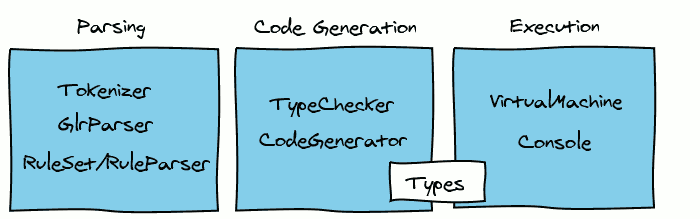
Console
(Source) A canvas that represents the screen and captures keyboard input
Virtual machine
(Source) The virtual machine executes bytecode. The bytecode instructions may manipulate the stack, jump to a new address, or use the console functions. They may also execute system functions (such as LEFT$) or system subroutines (such as CLS).
Types
(Source) Each type (single, double, integer, long, array, user) has functions to create an initial value, or to copy a value into a variable. Upon a copy, for instance, the integer type performs rounding and truncates the value to 16 bits.
Codegenerator
(Source) The code generator visits each node of the abstract syntax tree abd generates bytecode for it. It uses the type information added by the TypeChecker as an aid.
TypeChecker
(Source) The TypeChecker's job is to catch any errors before we try compiling. Without it, you could write a program that tries to multiply an array by the string "George". Then the virtual machine would say "WTF?!" and crash. It fills in the type for any expression in the syntax tree.
GlrParser
(Source) The GlrParser is an implementation of Tomita's GLR parser. It uses a RuleSet to parse the program into an abstract syntax tree.
Tokenizer
(Source) If you try to use javascript's built in Regex object for splitting text into tokens, you will soon pull your hair out and run screaming through the halls. Instead, the tokenizer implements a simple Thompson NFA with lazy evaluation. In some cases, this technique is faster than Javascript's own RegEx functions!
Ruleset
(Source) The ruleset contains grammar rules. In addition, it can remove redundant rules, and compute the FIRST and FOLLOW sets.
Ruleparser
(Source) The RuleParser is implemented on top of the RuleSet. It uses the parser to parse rules, and transforms them to add goodies like comma separated lists, kleene star, and alternation operators. But it's main purpose is to allow me to say, "My parser uses itself to parse its own rules!"
QBasic
(Source) Finally, qbasic.js contains all of the grammar rules and Abstract Syntax Tree nodes for BASIC programs.
Virtual machine
Executing Instructions
while( this.pc < this.instructions.length ) {
    var next = this.instructions[this.pc++];
    next.instr.execute( this, instr.arg );
}
Example
Here's some basic code:
A = 1
B = 2
PRINT A + B
   ' L1 A = 1
[0] pushconst 1
[1] pushref A
[2] assign
   ' L2 B = 2
[3] pushconst 2
[4] pushref B
[5] assign
   ' L3 PRINT A + B
[6] pushvalue A
[7] pushvalue B
[8] +
[9] syscall print
[10] pushconst 'n'
[11] syscall print
[12] ret
[13] end
    ASSIGN: {
        name: "assign",
        numArgs: 0,
        execute: function( vm, arg )
        {
            // Copy the value into the variable reference.
            // Stack: left hand side: variable reference
            // right hand side: value to assign.

            var lhs = vm.stack.pop();
            var rhs = vm.stack.pop();

            lhs.value = lhs.type.copy( rhs );
        }
    "+": {
        name: "+",
        numArgs: 0,
        execute: function( vm, arg )
        {
            var rhs = vm.stack.pop();
            var lhs = vm.stack.pop();
            vm.stack.push( lhs + rhs );
        }
    },
ASSIGN
Pop two things off the stack, and assign the value to the reference.
MEMBER_VALUE
Pop the reference to the user defined structure, and push the value of the named member.
MEMBER_DEREF
Like MEMBER_VALUE, but pushes a reference to the named mamber.
ARRAY_DEREF
Pop the array indices, and push a reference to the given location of the array.
PUSHCONST
Push the literal value onto the stack.
RET
destroy the current variable map, and restore the previous one, jumping to the previous value of PC.
GOSUB
Like call, but instead of using a new variable map, copy the current one.
CALL
Create a new, empty variable map, store PC in it, and jump to the given location.
JMP
Immediately jump to the given location.
BNZ
pop the top of the stack and jump to the given location if it is non-zero
MOD, /, *, +, -, AND, OR, NOT, <>, >=, <=, <, >, =
Pop one or two arguments off the top of the stack, perform the given operation, and push the result onto the stack.
BZ
Pop the top of the stack and jump to the given location if it is zero.
END
Halt the VM.
NEW
Create a new unnamed instance of the variable of the specified type, and push it onto the stack.
PUSHTYPE
Push the named type onto the stack
PUSHVALUE
Push the value of the given variable onto the stack.
PUSHREF
Push a reference to the given variable onto the stack.
POP
Pop the stack and discard
POPVAL
Set the given variable's value to be the value at the top of the stack.
RESTORE
Set data index to the given value
COPYTOP
duplicate the top of the stack.
FORLOOP
Using counter, step, and end value on the stack, determine if the for loop should continue. If not, jump to the given location.
SYSCALL
Call the given system function or subroutine (eg, LOCATE or CLS or LEFT$)
Console
Until next time
Further reading...

Comments