
Why are all my lines fuzzy in cairo?
Cairo is the hot new cross platform graphics library. It is becoming very popular, because it solves two outstanding problems in a portable way:
- Path based drawing
- Antialiasing
Both of these problems are astoundingly hard. You would have to read a whole
graphics textbook in order to implement basic drawing, and antialising. Before
cairo, your choices were Win32 GDI based drawing, or whatever GTK uses. In
addition, cairo is supported in Python.
The problem is that cairo has something that's not obvious for some people. A
lot of users might write a program to draw a line and get this:
The lines are all fuzzy! Even Inkscape, an otherwise well-polished
graphics program, has this naive implementation, and it
frustrates users to no end, because all of their lines are fuzzy.
The reason is because cairo's coordinates are centered on the pixel boundaries,
instead of in the middle of a pixel. So when you draw the line at
coordinate (2, 16), it is really beginning half way in between pixel 2 and
3, and pixels 16 and 17.
The immediate solution is to add 0.5 to all your coordinates. If you are doing
more complicated drawing, with varying pen widths and scales, you will have to
modify it somewhat. Also, this system breaks down as soon as you scale the
image smaller, as adding 0.5 starts to make huge errors in where things are.
But for an image that is not scaled smaller, please snap the coordinates to
avoid the fuzzy lines, and the eyesight of your users!
#!/usr/bin/python
import cairo

def drawLine( ctx, x1, y1, x2, y2 ):
    ctx.move_to( x1, y1 )
    ctx.line_to( x2, y2 )
    ctx.set_line_width( 1.0 )
    ctx.stroke()

surface = cairo.ImageSurface(cairo.FORMAT_RGB24, 32, 32)
ctx = cairo.Context( surface )
ctx.set_source_rgb( 1.0, 1.0, 1.0 )
drawLine( ctx, 2, 16, 30, 16 )
drawLine( ctx, 16, 2, 16, 30 )
surface.write_to_png( "out.png" )

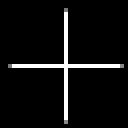
(Magnified 4 times)
#!/usr/bin/python
import cairo

def snapCoords( ctx, x, y ):
    (xd, yd) = ctx.user_to_device(x, y)
    return ( round(x) + 0.5, round(y) + 0.5 )

def drawLine( ctx, x1, y1, x2, y2 ):
    point1 = snapCoords( ctx, x1, y1 )
    point2 = snapCoords( ctx, x2, y2 )
    ctx.move_to( point1[0], point1[1] )
    ctx.line_to( point2[0], point2[1] )
    ctx.set_line_width( 1.0 )
    ctx.stroke()

surface = cairo.ImageSurface(cairo.FORMAT_RGB24, 32, 32)
ctx = cairo.Context( surface )
ctx.set_source_rgb( 1.0, 1.0, 1.0 )
drawLine( ctx, 2, 16, 30, 16 )
drawLine( ctx, 16, 2, 16, 30 )
surface.write_to_png( "out.png" )
Comments